

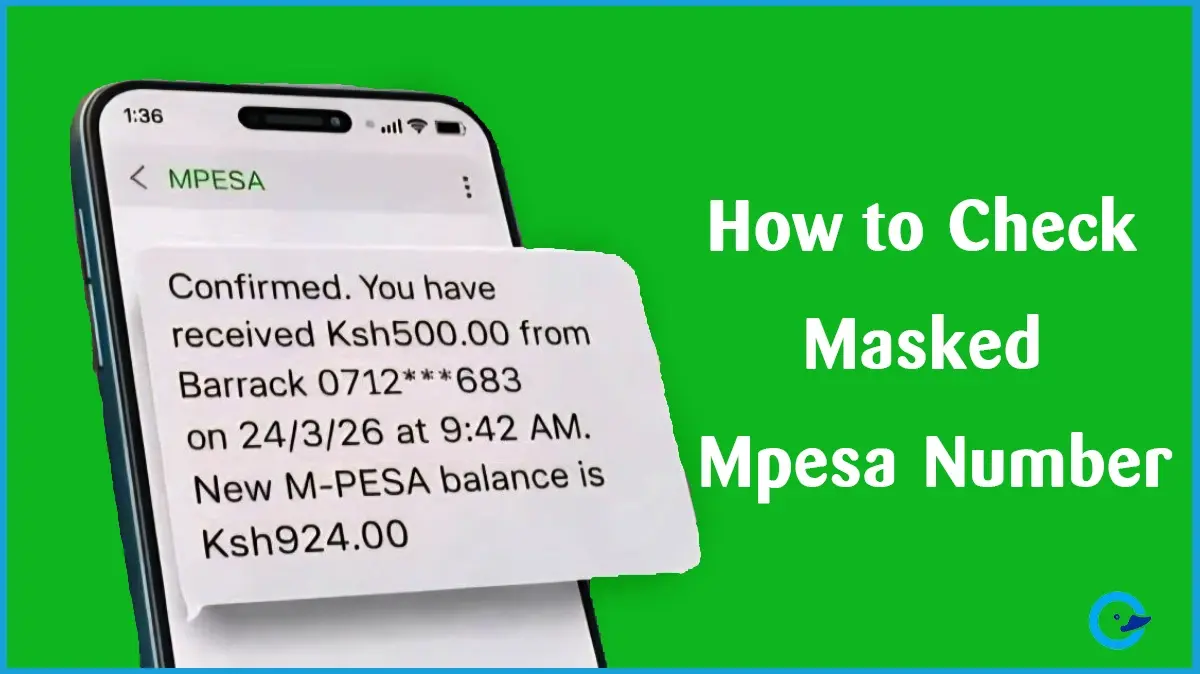
Many Kenyans try to check or confirm a full M-Pesa phone number after receiving money, reviewing a transaction, or trying to verify who sent funds. In most cases, users notice that Safaricom partially masks numbers inside M-Pesa statements and messages.
This has led to confusion, especially when someone wants to confirm a sender, recover an old contact, or investigate a suspicious transaction.
The important thing to understand is this: Safaricom intentionally masks some M-Pesa numbers for privacy and security reasons. There is no official tool that allows ordinary users to randomly unmask hidden M-Pesa numbers.
However, there are still legal and safe ways to verify M-Pesa details, access your M-Pesa transaction history, and sometimes recover the full number connected to a transaction.
Why M-Pesa Numbers Are Masked
Safaricom masks parts of phone numbers to protect customer privacy and reduce fraud risks.
For example, a transaction may appear like this:
0745***638
This helps prevent:
- Unauthorized access to personal information
- Social engineering scams
- Identity fraud
- Financial theft
Safaricom’s M-Pesa system is designed to balance transaction transparency with customer privacy protections. Users on Kenyan forums have repeatedly reported that statements and SMS confirmations sometimes hide middle digits for security reasons.
Can You Check a Full Unmasked M-Pesa Number?
In some situations, yes.
But it depends on:
- Whether the transaction belongs to your account
- Whether the number appears in your statement history
- Whether the contact is already saved
- Whether Safaricom’s systems display the full number for that transaction
There is no legitimate public tool that reveals hidden M-Pesa numbers belonging to strangers.
Be cautious of websites, apps, or Telegram groups claiming they can “unmask” M-Pesa numbers. These are often scams designed to steal data or money.
Safe Ways to Check or Verify an M-Pesa Number
1. Request an M-Pesa Mini Statement
One of the easiest official methods is requesting a mini statement from Safaricom.
According to Safaricom and M-Pesa support documentation, mini statements show your recent transactions and are accessible through USSD or the M-Pesa app.
How to Get an M-Pesa Mini Statement
- Dial *234#
- Select My M-PESA Information
- Select M-PESA Statement
- Choose Mini Statement
Safaricom will send an SMS containing your recent transactions.
Mini statements usually display:
- Transaction codes
- Recipient or sender names
- Transaction amounts
- Phone number details
- Updated balance
Some users report that mini statements sometimes show fuller phone number details compared to standard SMS notifications.
2. Request a Full M-Pesa Statement
If the mini statement does not provide enough information, you can request a full statement.
Safaricom officially allows users to generate statements through:
- *334#
- The M-Pesa app
- MySafaricom app
How to Request a Full Statement
- Dial *334#
- Select My Account
- Select M-PESA Statement
- Choose Request Statement
- Select the period
- Enter your email address
- Confirm with your M-Pesa PIN
Safaricom states that statements are normally delivered within five minutes.
Full statements provide:
- Detailed transaction history
- Dates and timestamps
- Amounts sent or received
- Transaction references
However, some statements may still partially mask phone numbers for privacy compliance. Users on Kenyan forums have confirmed this behavior.
3. Use the Send Money Confirmation Prompt
One of the safest and most reliable ways to verify a number is through the M-Pesa send money prompt.
Before completing a transaction:
- Enter the phone number
- Input the amount
- M-Pesa displays the registered account name
This allows you to confirm whether the number belongs to the intended recipient before sending money.
This verification step is one of M-Pesa’s most important anti-fraud protections.
4. Check Saved Contacts
If the number belongs to someone you previously interacted with, checking:
- Your phone contacts
- Telegram
- Previous SMS history
may help you recover the full number.
Some users searching for hidden M-Pesa numbers were actually able to recover them from saved contacts rather than M-Pesa itself.
5. Use the M-Pesa App Transaction History
The M-Pesa app and MySafaricom app sometimes display more transaction details than SMS messages.
To check:
- Open the M-Pesa app
- Go to Statements or Transactions
- View recent activity
Safaricom officially supports statement access through the app.
However, some Kenyan users have recently complained about app bugs and missing transaction history after updates.
Because of this, many users still prefer USSD statements.
Common Reasons People Want to Check Full M-Pesa Numbers
Most users are not trying to invade privacy. Common reasons include:
- Confirming who sent money
- Verifying suspicious transactions
- Recovering lost contacts
- Avoiding sending money to the wrong person
- Confirming business payments
- Tracking old transactions
These are legitimate concerns, especially because M-Pesa is deeply integrated into everyday life in Kenya.
Risks of Trying to Unmask Numbers Online
Many fake services claim they can reveal hidden M-Pesa numbers.
Avoid:
- APK apps promising hidden access
- Websites requesting your PIN
- Telegram “hack” services
- Fake Safaricom agents
- Tools asking for OTP codes
These scams can lead to:
- Account theft
- SIM swap fraud
- Loss of M-Pesa funds
- Identity theft
Safaricom never asks for your M-Pesa PIN through unofficial channels.
What to Do If You Suspect Fraud
If you notice suspicious transactions:
- Contact Safaricom immediately
- Call customer care using 100 or 234
- Reverse mistaken transactions quickly
- Do not share your PIN or OTP
- Save transaction reference messages
Safaricom also recommends using official reversal procedures instead of handling disputes privately.
Best M-Pesa Safety Practices
To stay safe when using M-Pesa:
- Always confirm recipient names
- Double-check numbers before sending money
- Avoid rushing transactions
- Use official Safaricom channels only
- Keep your PIN private
- Review transaction confirmations carefully
Even a single wrong digit can send money to the wrong person.
Final Thoughts
Checking a full M-Pesa phone number is only possible in limited situations through official transaction records, statements, or saved contacts. Safaricom masks numbers primarily to protect customer privacy and reduce fraud risks.
Instead of looking for unofficial “unmasking” tools, the safest approach is to use:
- M-Pesa statements
- Send money verification prompts
- Transaction history
- Official Safaricom support
In most cases, these methods provide enough information to confirm a transaction while keeping your account secure.


