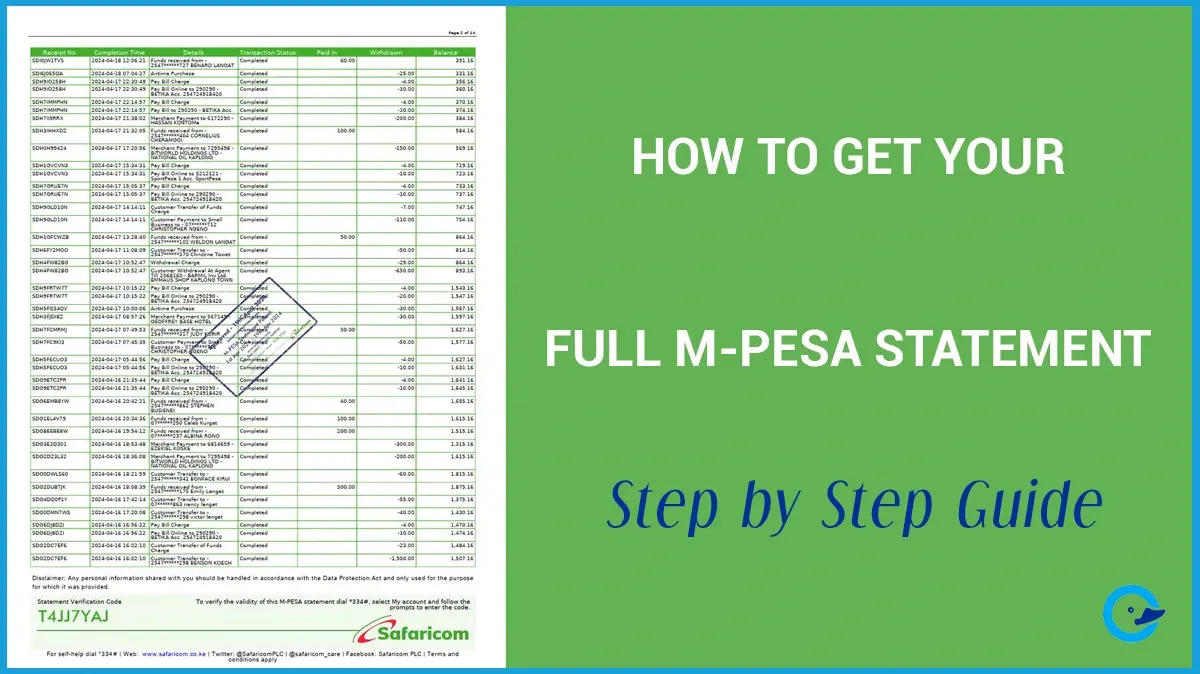
Your M-Pesa statement helps you track your finances and in that way you can be able to identify:
- To whom you sent money
- From whom you received money
It is one of the most important financial records to have especially in countries where M-Pesa services are offered. Besides sending and receiving.
You can use M-Pesa statement to also monitor business transactions, or prepare financial records either for your business or personal finance.
Safaricom PLC allows users to request detailed M-Pesa statements through several official channels:
- USSD codes
- The MySafaricom app
- The M-Pesa app
- Email statements
- Safaricom customer care
According to Safaricom, users can request statements covering different transaction periods directly from their phones.
What Is an M-Pesa Statement?
An M-Pesa statement is a detailed transaction report showing activity on your M-Pesa account over a selected period.
When you request for a statement, you receive a detailed emailed PDF report containing:
- Money sent and received
- Airtime purchases
- Paybill transactions
- Till number payments
- Fuliza transactions
- Transaction dates and times
- M-Pesa balances
- Transaction reference codes
The Importance of M-Pesa Statement
Many Kenyans only request statements when there is a problem, but regularly reviewing your statement can help you manage your finances better.
1. Track Your Spending
Your statement helps you see:
- Where your money goes
- How much you spend monthly
- Which services consume most of your money
This is especially useful for budgeting.
2. Verify Transactions
M-Pesa statements help confirm:
- Successful payments
- Received funds
- Reversed transactions
- Business payments
This can be useful during disputes or payment disagreements.
3. Business Record Keeping
Thousands of Kenyan businesses rely on M-Pesa daily.
Statements help business owners:
- Track customer payments
- Monitor cash flow
- Keep accounting records
- Reconcile transactions
4. Tax and Financial Documentation
Some users use M-Pesa statements when:
- Applying for loans
- Filing taxes
- Providing proof of income
- Preparing financial reports
How to Get Your Full M-Pesa Statement via USSD
The fastest method for most users is through Safaricom’s USSD menu.
According to Safaricom Support, users can request statements directly from their phones using *334#.
Step 1: Dial *334#
Open your dial pad and enter:
*334#
Then press the call button.
Step 2: Select “My Account”
From the menu, select:
My Account
Menu options may vary slightly depending on updates.
Step 3: Choose “M-Pesa Statement”
Select:
M-Pesa Statement
Step 4: Select “Request Statement”
Choose:
- Mini statement
- Full statement
For detailed records, select Full Statement.
Step 5: Enter Your Email Address
Safaricom will ask you to enter your email address.
If your email is already registered, confirm it.
If not, add a valid email address where the statement will be sent.
Step 6: Choose the Statement Period
You can select different time ranges depending on your needs.
Examples may include:
- 1 month
- 3 months
- 6 months
Step 7: Confirm With Your M-Pesa PIN
Enter your M-Pesa PIN to complete the request.
Safaricom states that statements are usually sent within a few minutes.
How to Get Your M-Pesa Statement Using the M-Pesa App
Safaricom also allows users to request statements through the M-Pesa app.
Step 1: Open the M-Pesa App
Launch the official M-Pesa app on your phone.
If you do not have it installed, download it from:
- Google Play Store
- Apple App Store
Step 2: Log In
Enter:
- Your Safaricom number
- M-Pesa PIN or biometric authentication
Step 3: Go to Statements or Transactions
Inside the app:
- Tap the M-Pesa menu
- Select Statements or Transactions
Step 4: Request the Statement
Choose:
- Mini statement
- Full statement
- Statement period
The statement will be emailed to your registered email address.
According to Safaricom, the app supports access to transaction history and statements.
How to Get Your Statement Through the MySafaricom App
The MySafaricom app also provides M-Pesa statement services.
The process is similar to the M-Pesa app:
- Open the app
- Log in
- Go to M-Pesa services
- Select statements
- Choose the statement period
- Request the statement
Some users prefer the MySafaricom app because it combines in one place:
- Airtime management
- Data bundles
- M-Pesa services
- Account settings
How to Receive Monthly M-Pesa Statements Automatically
Safaricom also allows users to register for automatic monthly statements.
This can be useful if you:
- Run a business
- Track expenses regularly
- Need monthly financial records
How to Register
- Dial
*334# - Go to M-Pesa Statement
- Choose recurring or monthly statements
- Confirm your email address
Once activated, statements are automatically sent to your email every month.
How Long Does It Take to Receive an M-Pesa Statement?
According to Safaricom, statements are usually delivered within a few minutes after the request is made.
However, delays may happen because of:
- Network congestion
- Incorrect email addresses
- System maintenance
- App issues
If you do not receive the statement:
- Check your spam folder
- Confirm your email address
- Retry the request later
Common Problems When Requesting an M-Pesa Statement
Statement Not Received
This is one of the most common complaints.
Possible causes include:
- Wrong email address
- Delayed processing
- Poor network connection
Try requesting the statement again after some time.
Forgot Registered Email
If you forgot the registered email:
- Update it through
*334# - Use the app
- Contact Safaricom support
App Not Working
Some users occasionally report:
- Missing statements
- Login errors
- Loading problems
Using the USSD option is often more reliable during app outages.
Can You Get Old M-Pesa Statements?
Yes.
Safaricom allows users to request historical statements for selected periods, though the available range may depend on system limitations and account history.
For very old records, Safaricom customer care may provide additional guidance.
Is Your M-Pesa Statement Secure?
Yes.
M-Pesa statements are protected because:
- Requests require your PIN
- Statements are sent to your registered email
- Transaction data is encrypted through Safaricom systems
Things you should never share with anyone:
- Your M-Pesa PIN
- OTP codes
- Statement login details
Final Thoughts
Your M-Pesa statement is more than just a transaction history. It is an important financial tool that helps you monitor spending, verify payments, manage business transactions, and maintain financial records.
The easiest ways to request your statement are through:
- *334#
- The M-Pesa app
- The MySafaricom app
For most users, the USSD method remains the fastest and most reliable option, especially when app services experience delays or technical issues.