
















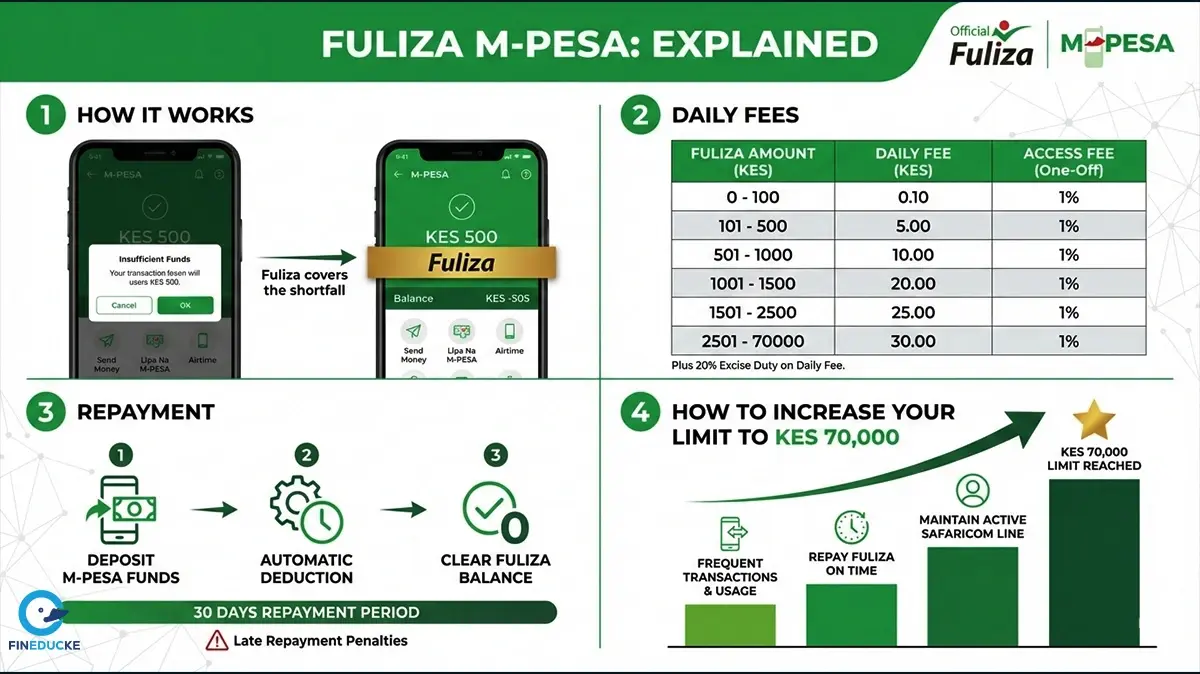
Fuliza M-PESA is a continuous mobile overdraft service that is offered by Safaricom to its M-PESA customers. In this service, Safaricom PLC has partnered with NCBA Bank and KCB Bank. The service allows M-PESA users to complete eligible transactions even when their M-PESA balance is insufficient. As a Safaricom and M-PESA user, when you don’t have enough money in your M-PESA, the shortfall is covered automatically and recovered from future deposits that you will receive in your M-PESA account.
Take note, Fuliza is not a loan and so don’t treat it like one. It is a continuous overdraft facility that activates automatically when your balance is low. It is commonly used for sending money, paying bills, buying goods, and purchasing airtime directly from M-PESA.
Fuliza enables registered M-PESA customers to complete transactions without having enough funds in their wallet. Once you activate Fuliza, the service automatically tops up the transaction amount based on the limit assigned to your by Safaricom based on your account history.
Key characteristics of Fuliza M-PESA:
Note: You only use Fuliza when your balance is insufficient, and you only pay charges for the amount actually used.
Also read: How Much It Costs to Send and Withdraw Money in 2026
For you to qualify for Fuliza M-PESA, you must:
Each Safaricom line is assessed independently, meaning multiple lines under one person can have different Fuliza limits. However, mostly, if you don’t have frequent transactions, the primary line is the one that will qualify for Fuliza.
After successful activation, you receive an SMS confirming your Fuliza limit.
Fuliza works automatically. You do not select it manually during transactions.
If the transaction amount exceeds your available balance, Fuliza covers the difference as long as it is within your assigned limit.
Fuliza charges consist of:
|
Fuliza Amount / Band (KSH) |
Tariff
(KSH) |
20%
Excise Duty (KSH) |
Daily
Free / Total Charges (KSH) |
|
0 -100 |
0 |
0 |
0 |
|
101-500 |
2.5 |
0.5 |
3 |
|
501-1000 |
5 |
1 |
6 |
|
1001-1500 |
18 |
3.6 |
21.6 |
|
1501-2500 |
20 |
4 |
24 |
|
2501-70000 |
25 |
5 |
30 |
N/B: Normal M-PESA transaction charges apply separately. Daily fees continue to accrue until the outstanding balance is fully cleared, making early repayment cheaper.
Any funds deposited or received into your M-PESA account are automatically used to repay the Fuliza balance before the funds become available for other transactions.
You can check your Fuliza balance using:
Each Fuliza transaction also triggers an SMS showing the outstanding balance.
Fuliza limits are reviewed periodically, typically every three months. Increases are not guaranteed and depend on account behavior.
Therefore, for you to increase your Fuliza limit up to Ksh. 70,000, you should strive to maintain an excellent repayment history. In this regard, you should repay borrowed amounts as quickly as possible, ideally before midnight of the following day. This avoids daily maintenance fee. Also, you should never exceed the 30-day repayment period.
The second hack for increasing M-PESA Fuliza limit is by increasing your transaction volume. Usage volume accounts to nearly 25% of the scoring signal when reviewing limits.
Thirdly, build a strong credit profile. Therefore, it is important that you pay all your other loans, including digital loans on time. These loans include bank loans, mobile loans and credit cards. You should also maintain good debt-to-income ratio and avoid being blacklisted by CRB. Moreover, always remember to check your credit report frequently. It is advised to check your credit score at least once a year.
Factors that influence limit increases include:
You can check your current Fuliza limit via *334# or through the M-PESA App.
There is no fixed limit on how many times Fuliza can be used. You can use it repeatedly as long as:
Fuliza transactions follow standard M-PESA limits:
No. Fuliza M-PESA does not allow cash withdrawals. It only supports eligible digital transactions such as sending money, paying bills, buying goods, and purchasing airtime.
If you send money or pay to the wrong number or till using Fuliza:
If a Fuliza balance remains unpaid after 30 days:
For you to deactivate Fuliza, follow the steps below:
You can also opt out through the M-PESA App. All outstanding Fuliza balances must be cleared before opting out.
Fuliza M-PESA is designed for short-term cash flow gaps within the M-PESA ecosystem. When used responsibly and repaid promptly, it provides a reliable way to complete essential transactions without delays or declined payments.
The Fineducke Team is a group of passionate writers, researchers, & finance enthusiasts dedicated to helping the youth make smarter money decisions. From saving tips, investment ideas to digital income guides, our team works together to bring you easy-to-understand, practical content tailored for everyday life believing financial education should be simple & relatable.






























Leave a Comment:
Please log in to leave a comment.
Comments:
No comments yet. Be the first to comment!